Barcelona, Spain
← Projects
LinguaGym icon
LinguaGym
Language

Beyond rigid answers — language drills scored by LLM across 10 languages.

Offers four distinct practice modes: comprehension, phrasing, listening, and dictation. Powered by flexible LLM feedback, you can practice natural language skills without being restricted to rigid textbook answers.
It also features AI-powered automatic generation for practice materials.

Searched words are saved instantly to a shared vocabulary list connected to the AI conversation app, LinguaCoach—expanding your vocabulary across the product ecosystem.

Next.js 15TypeScriptSupabaseClaude APIWeb Speech API
LinguaGym

01Problem → Solution

PROBLEMSOLUTION
PROBLEM 01
You find an article you want to read, but turning it into practice takes extra work

Even with a book or article you want to study, turning it into practice material means copying and pasting into another tool. The moment there's friction, you can't keep it up.

SOLUTION

Replace material sourcing with AI content generation, erasing the hassle of jumping between tools altogether.

PROBLEM 02
Just reading the translation won't train your writing or listening

Most translation tools stop at "show the translation." They aren't built to train all four directions — reading, writing, listening, and dictation — from the same material.

SOLUTION

Expand a single piece of material across four modes and train multi-directional output end to end.

PROBLEM 03
The words you look up and the mistakes you learn vanish on the spot

Words you look up mid-practice and your scoring results don't carry over across sessions. When everything resets each time, you never feel anything building up.

SOLUTION

Scoring, vocabulary, and history come together on one screen, and the vocabulary book is shared with LinguaCoach too. Your words keep accumulating across sessions and even across products.

  • The core was fixed on a single point: never making you switch tools. Sourcing material, four-directional output, and accumulating learning context — completing all of it within one screen and one product was the top priority.

02Key features

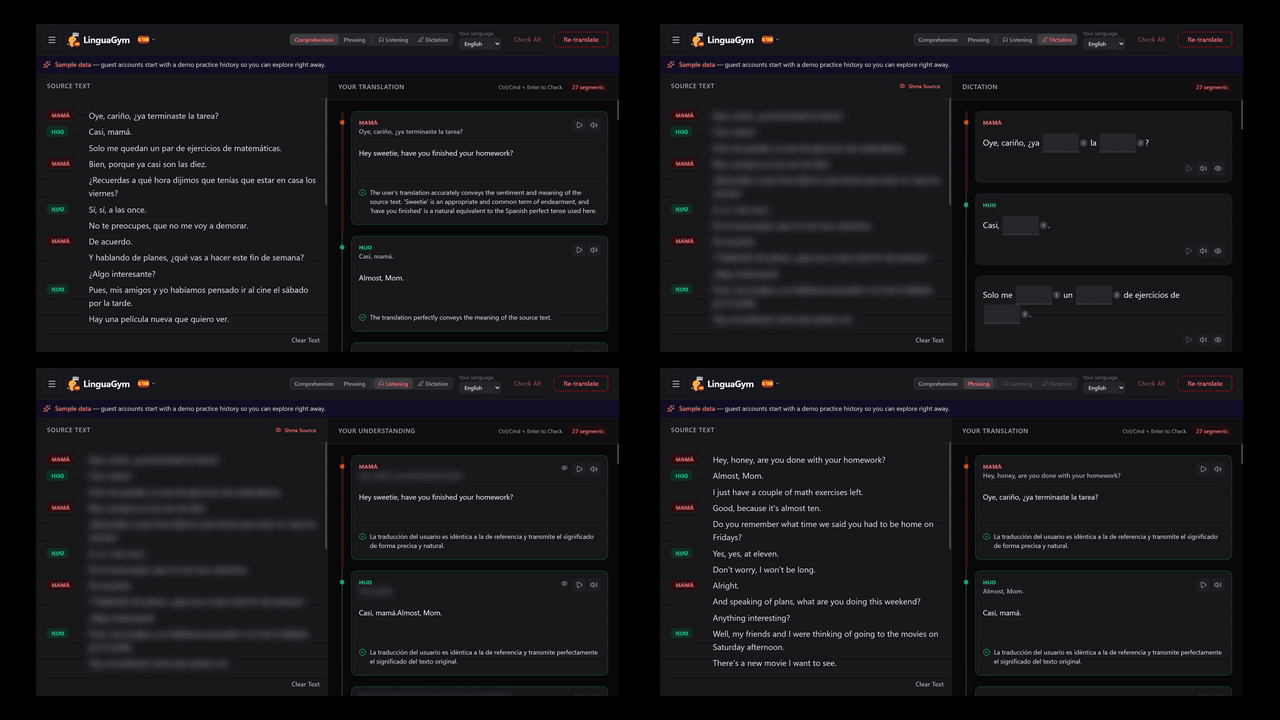
Freely switch between 4 learning modes (read, translate, listen, write)
01

Freely switch between 4 learning modes (read, translate, listen, write)

  • ComprehensionTranslate foreign → native to measure comprehension
  • PhrasingRephrase native → target to build expression
  • ListeningHide the source and transcribe what you hear
  • DictationWrite out AI-generated fill-in-the-blank items
DESIGN RATIONALE

Existing tools that stop at "just showing the translation" leave a gap between understanding and actually using the language. By letting you switch across four modes while the material stays fixed, switching cost drops to zero.

02

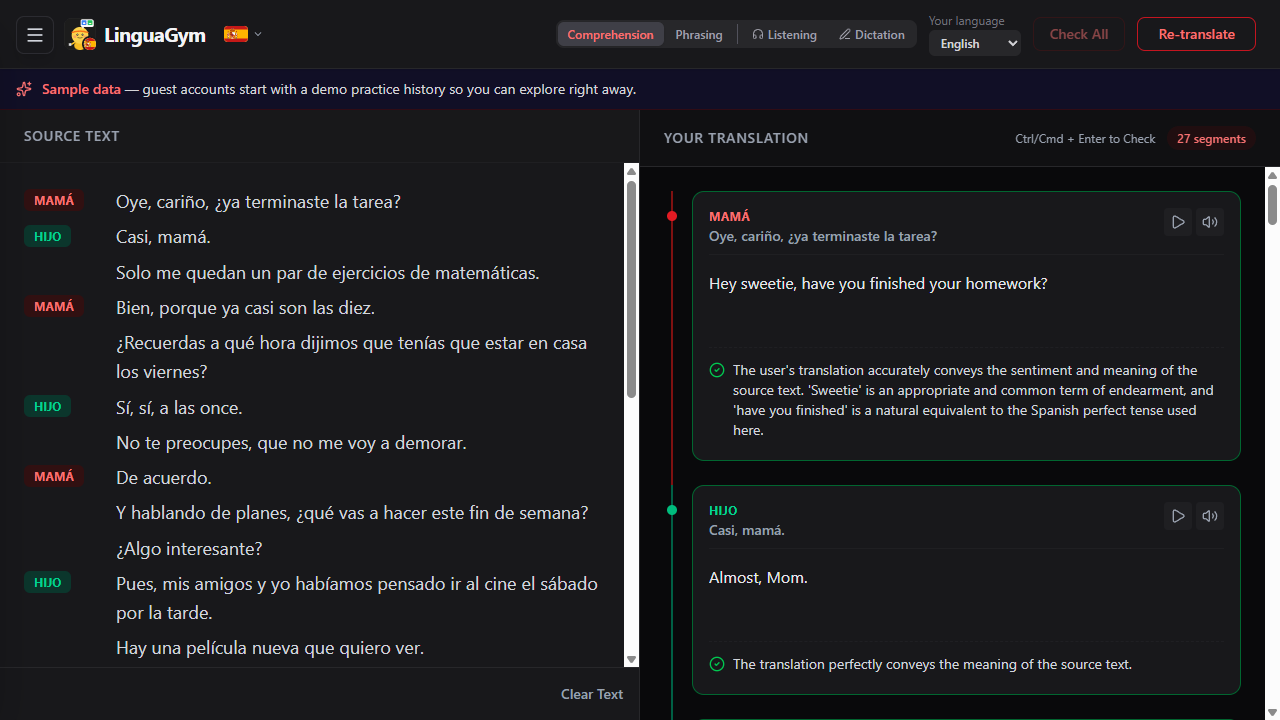
Segment structure and real-time AI scoring

  • Automatic segmentationAI splits text into meaning units
  • Instant three-level scoringGreen, yellow, red — with reasons and suggested fixes
  • Batch scoring and shortcutsAn operation flow that never breaks your rhythm
DESIGN RATIONALE

Translating a whole text at once hides where you actually stumbled. Breaking it into segments raises the granularity of understanding, and instant inline scoring makes the fix-and-retry loop as short as possible.

03

Cutting material-sourcing cost to zero — content generation and OCR design

  • 4-level difficulty text generationAI generates reading texts on demand
  • Skit generation in 4 categoriesCreates dialogue-format practice material
  • OCR captureTurn photos of book or document pages into material (in development)
04

A dictionary and inline vocabulary book, all on one screen

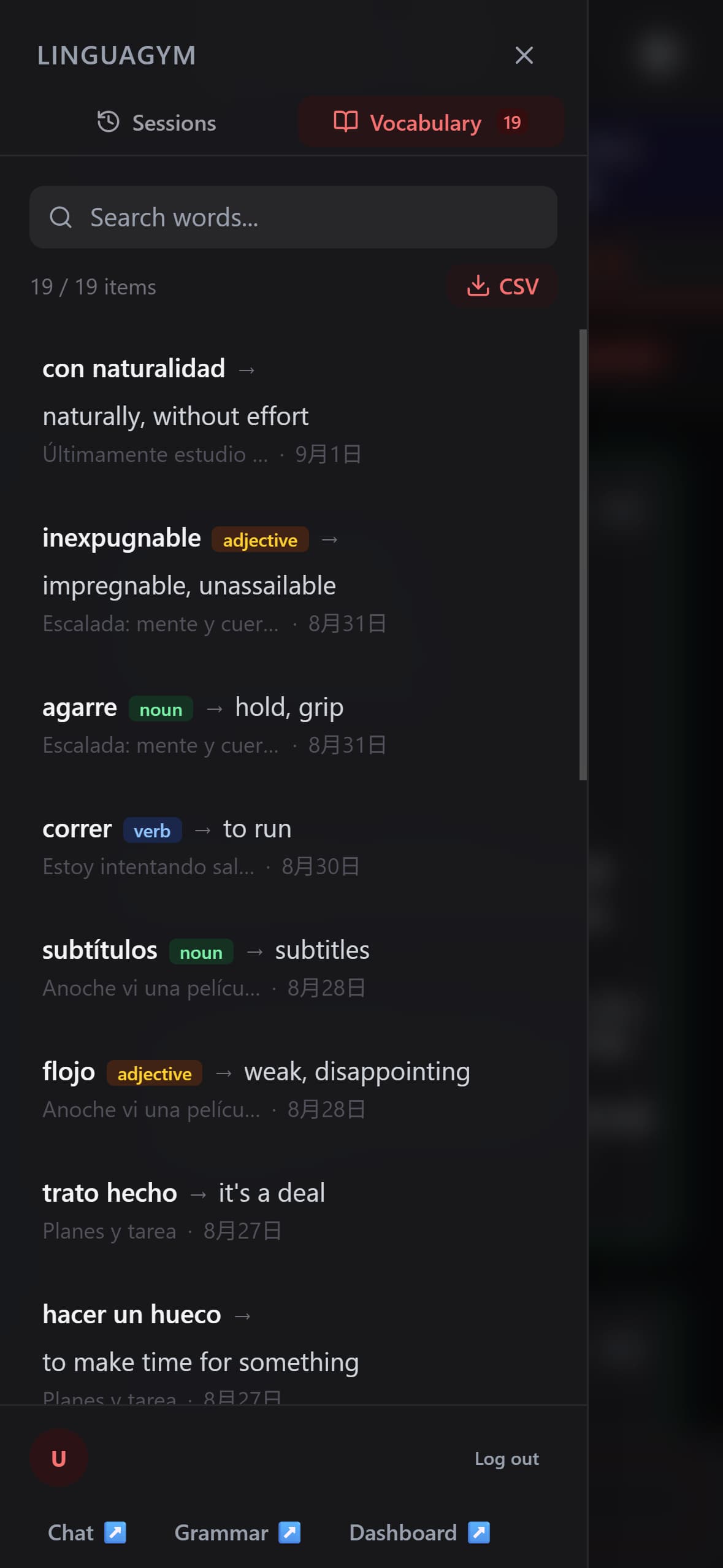
  • Inline savingSelect text and save the translation and part of speech in one tap
  • Real-time searchSearch by word form, translation, or session name
  • CSV exportConnect with external tools
  • LinguaCoach integrationVocabulary data shared across both products
DESIGN RATIONALE

Switching to a dictionary or another app cuts off your learning context, so I made everything from selecting to saving happen in the fewest possible steps.

05

Per-language visual themes and a 10-language extensible design

  • 10 languagesSpanish, English, Japanese, Korean, and more
  • Language-linked UI themeThe color scheme switches automatically with the language you study
  • Independent per-language managementSessions and vocabulary are separated by language, so parallel study never collides
DESIGN RATIONALE

Linking the UI theme to the language is a design choice made to heighten immersion.


03Tech stack

Next.js 15
App Router + Server Components
TypeScript
End-to-end type safety
Supabase
Postgres + Row Level Security
Claude API
Haiku — 採点・フィードバック・テキスト生成
Web Speech API
ブラウザネイティブ TTS / STT

04Why I built this

Reading structured text is the best way to absorb vocabulary, syntax, and logic. But passive reading masks comprehension gaps—you only discover what you don't know when you translate.

Turn anything I read into immediate practice.

I built a single-screen workflow combining content sourcing with four output modes. If you lack material, AI generates level-tailored passages and skits. Removing sourcing friction is essential for building a habit.

(Book-page OCR was paused for parallel dev, but remains high on the roadmap.)

  • Zero-Sourcing Drills: Turn any text into instant practice
  • 4-Way Output: Reinforce learning from multiple angles
  • Unified Vocab Base: Grow word assets across products

— The Outcome —

Segment-level feedback pinpointed misreadings on the spot, turning intimidating long texts into a sustainable daily routine.


05Engineering decisions

01

Dropped batch scoring for a structure that grades by meaning-unit segments across two criteria (Comprehension / Phrasing)

PROBLEMScoring an entire text at once can't reveal the fine grain of understanding — the specific bottlenecks

I had the AI handle segmentation into meaning units, tuning feedback granularity to the user's own "units of understanding." On top of that, I implemented logic that switches between two scoring modes: Comprehension, which measures accuracy of meaning, and Phrasing, which measures how natural the wording feels.

From pinpointing where you stumbled to presenting native-like phrasing, it anchors the heart of the UX in both the granularity and the quality of scoring
02

Rather than confining the vocabulary book to one app, unified it at the backend for cross-reference with LinguaCoach

PROBLEMLocking data inside a single app fractures the user's growing vocabulary asset at the product boundary

Instead of trapping vocabulary data inside one dedicated app, I unified it at the backend. I defined a data structure where words met in the translation drills (GYM) are seamlessly cross-referenced and synced into conversation practice (COACH) as well.

Two independent products stay continuous as learning data, building an ecosystem where the more apps you add, the more the user's asset grows
03

Removed furigana and phonetic display after building them, prioritizing the lightness of the core experience

PROBLEMThe more accuracy you chase, the heavier the processing gets, hurting the reading experience itself

I once implemented furigana and phonetic display for Japanese, Chinese, and French. But the harder I tried to guarantee accuracy, the heavier it ran, eating into the tempo of the core experience of "reading text." Reassessing it — including the maintenance cost of rolling it out to every supported language — I judged the return didn't justify the investment within a personal-use scope, and removed the feature entirely.

By subtracting features rather than adding them, I protected the core value of reading tempo
04

Encapsulated sessions, vocabulary, and progress per language, achieving expansion with "no design changes"

PROBLEMIn typical multilingual setups, every language you add or spec you change raises the cost of interfering with existing data and running regression tests

I adopted an architecture that encapsulates — scopes — session, vocabulary, and progress data independently "per language." The UI theme's language-linking logic follows the same pattern based on this language key.

It keeps the risk of interfering with existing data at zero, making adding new languages, extending to certification systems, and repurposing for other products possible with "no design changes"

Try it out

No signup required — guest mode available